
返回 >>使用技巧
操作步骤:
打开Brother iPrint&Scan 点击“扫描”—“所有设置”
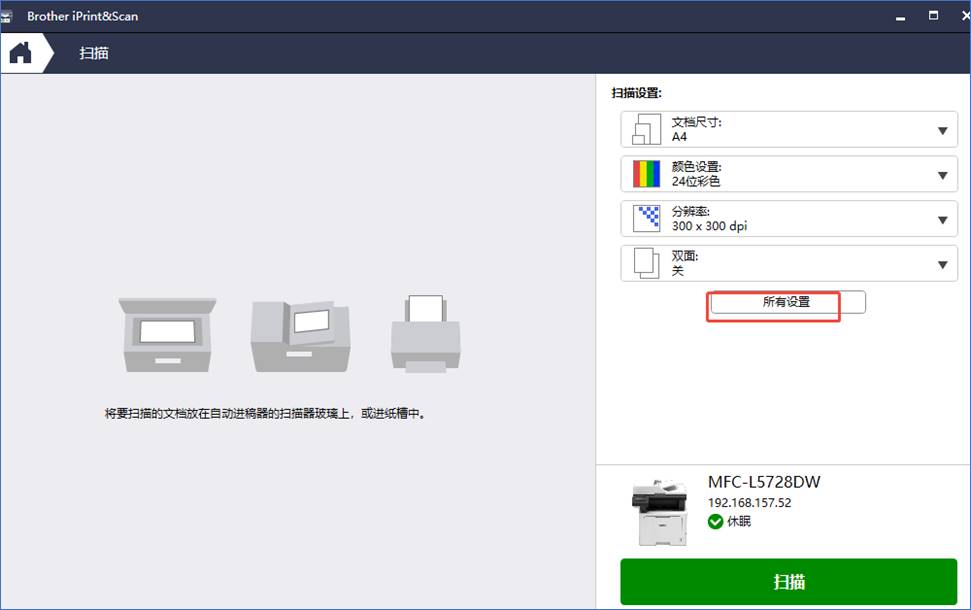
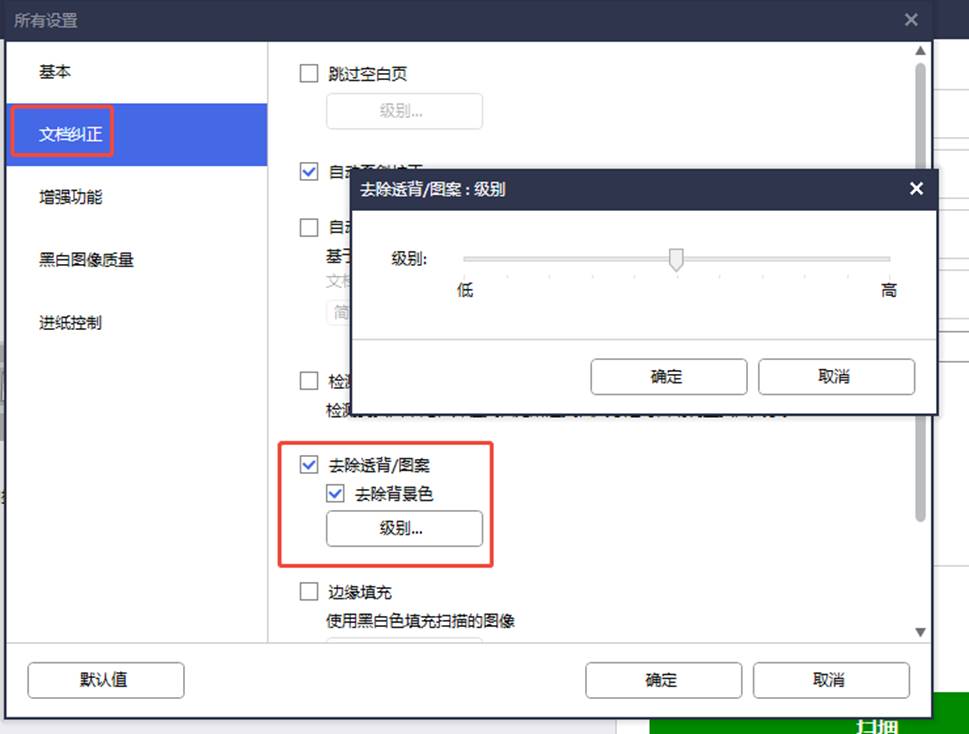
点击“文件纠正”—“去除背景色”—"级别”—拉动滑块左右选择高低级别,点确定。
亲爱的用户:
感谢您使用Brother产品及服务!
为了持续向您提供更加丰富的产品功能,更智能、高效的使用体验,不断提升用户满意度,基于产品功能运行与服务的迭代需求,我们需要对您在使用Brother产品及服务的过程中,产生的必要数据(如设备信息、配置参数等)进行收集、处理。这些数据将有助于我们精准优化打印效率、提升响应速度及满足个性化需求,让每一次操作都更贴合您的期望。
我们深知,您的信任是我们最宝贵的财富!我们非常重视保护您的个人信息、隐私及数据,始终将您的个人信息、隐私与数据安全置于首位,为此我们将在严格遵守中华人民共和国《网络安全法》、《数据安全法》、《个人信息保护法》等法律、行政法规的要求,并在落实国家有关标准与行业实践的基础上,以合法、正当、必要、诚信为原则,依法保护、处理您的个人信息、隐私及数据。
为了更好地保障您的知情权、选择权等合法权益,帮助您清晰、完整地了解我们如何收集、保护、处理您的个人信息,特别是涉及未成年人信息等重要场景,在您使用本产品及服务前,请务必全面、详细阅读以下“产品使用与隐私保护”、“数据保护与处理”、“未成年人信息保护”中的所有内容! 这既是对您自身权益的积极保护,也是对我们工作的有力支持。
感谢您的理解与配合!
Brother将始终秉承“At your side.”的理念,在合规、安全、透明的基础上,与您携手,共创更美好的数字化办公体验!
一、产品使用与隐私保护;
本章节内容,将主要向您阐明:您在使用本产品及服务前,需要注意的相关事项,以及使用过程中,我们将如何收集、保护、处理您的个人信息、隐私等必要数据,包括:
如需进一步了解“产品使用与隐私保护”的其他内容,请点击 了解更多
二、数据保护与处理
本章节内容,将主要向您阐明:为了向您提供更为丰富、智能、高效的产品功能和用户体验,我们将可能委托Brother关联公司、第三方服务供应商提供相关数据处理、保护等服务,包括:
如需进一步了解“数据保护与处理”的其他内容,请点击 了解更多
三、未成年人信息保护
本章节内容,将主要向您阐明:未成年人(特别是未满14周岁的未成年人)用户在使用本产品及服务前,本人及其监护人需要知晓的个人信息收集、处理规则,包括:
如需进一步了解“未成年人信息保护”的其他内容,请点击 了解更多